What's Really Inside a Video File — and the Strange Story of the MP3
Extracting audio from a video isn't 'converting' — it's lifting one stream out of a box. Here's what's actually inside a video file, how MP3 shrinks sound by deleting what your ears can't hear, and th
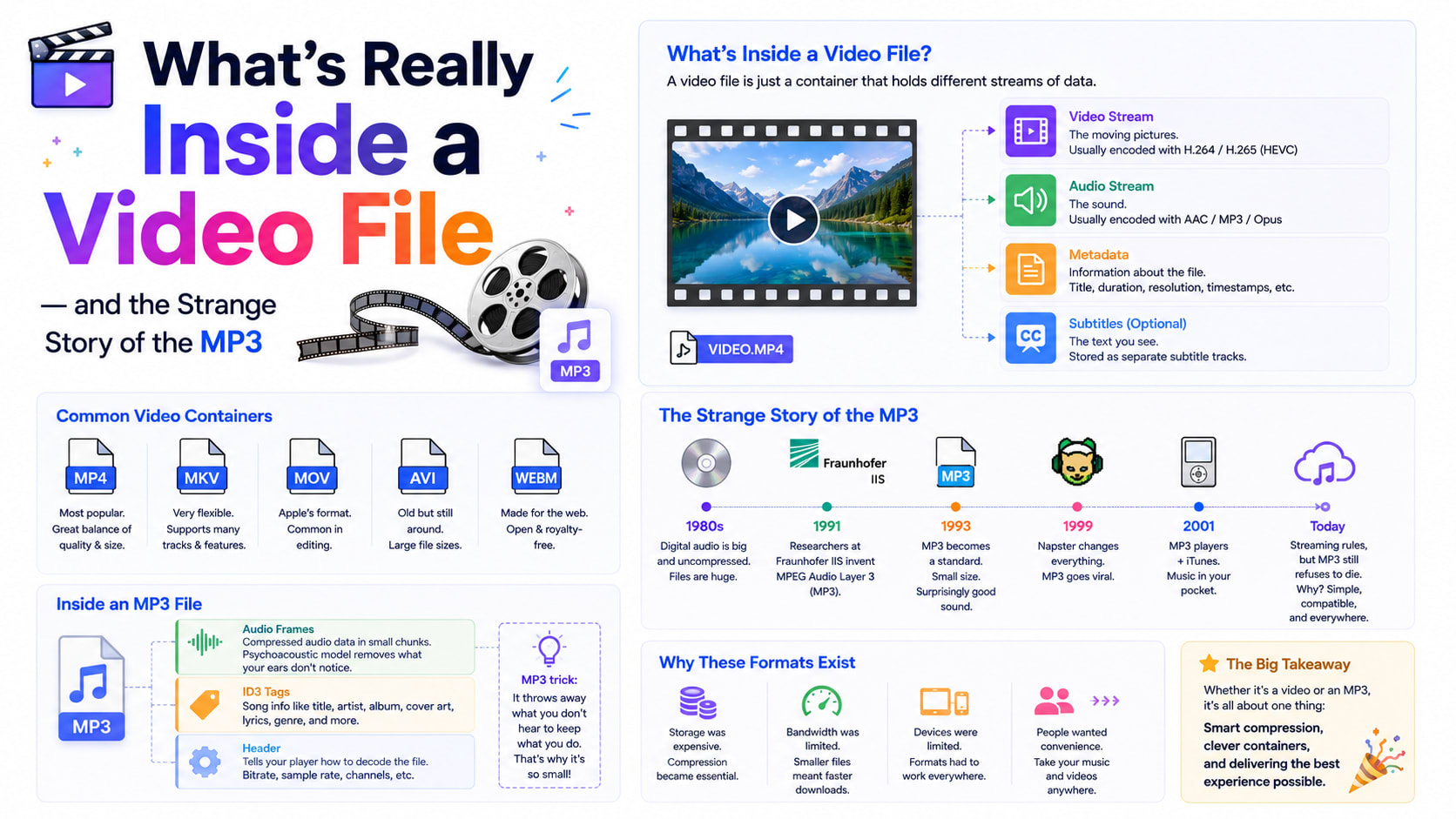
When you pull the audio out of a video, you're doing something that feels almost magical — a video goes in, and a clean little music file comes out, no picture attached. But what you're actually doing is far more interesting than "converting." You're reaching into a container, lifting out one of the streams stored inside it, and re-packaging it on its own. And the format you usually choose for that audio — MP3 — has one of the strangest, most consequential origin stories in all of consumer technology.
Understanding both of those things — what's really inside a video file, and why MP3 took over the world — makes you a much smarter user of every media file you touch.
A video file is a box, not a picture
Here's the first surprise that trips up almost everyone. An ".mp4" is not a video the way a ".txt" is text. MP4, MKV, MOV and WebM are containers — boxes. Inside the box are separate streams: usually one video stream, one audio stream, and often extras like subtitles, chapter markers or multiple language tracks. The container's job is just to hold these streams together and keep them synchronised so the picture and sound stay in step.
This is why "converting a video to MP3" isn't really converting at all, in the destructive sense. The audio was always in there, sitting beside the video as its own stream. Extracting it is closer to opening a parcel and taking out one item, leaving the rest behind. A video-to-MP3 tool does exactly this: it reads the container, finds the audio stream, and writes it out as a standalone file — and if the original audio is already in a compatible format, it can even copy it out without re-encoding at all.
The container-versus-codec distinction matters in daily life. The same MP4 box might hold H.264 video and AAC audio; a WebM box might hold VP9 video and Opus audio. The file extension tells you the box, not necessarily what's inside it — which is why two ".mp4" files can behave completely differently, and why a video sometimes plays its picture but not its sound on an old device that doesn't recognise the particular audio codec inside.
Why audio has to be compressed at all
Just like video, raw audio is bulkier than you'd think. CD-quality sound — the benchmark for "lossless" digital audio — samples the sound wave 44,100 times every second, with 16 bits of precision, across two channels. That works out to roughly 1.4 megabits per second, or about 10 MB per minute. A single three-minute song in raw form is around 30 MB; an album is hundreds.
In the 1990s, when hard drives were measured in megabytes and internet connections crawled, that was hopeless. You could not fit a music collection on a computer, let alone email a song or carry it in your pocket. The whole dream of digital music depended on making audio dramatically smaller without making it sound obviously worse. That problem is what gave us MP3.
The beautiful trick: throwing away what you can't hear
MP3's core idea is the same audacious bet that powers JPEG and video compression — discard the parts a human won't notice. But for sound, the science behind which parts to discard is gloriously specific, and it's called psychoacoustics: the study of how human hearing actually works, with all its quirks and blind spots.
Your ears are not perfect microphones. They have well-documented limitations, and MP3 exploits every one. The most powerful is auditory masking: a loud sound makes nearby quieter sounds inaudible. When a cymbal crashes, you genuinely cannot hear a soft triangle ding at a similar pitch a fraction of a second later — your hearing is briefly overwhelmed. MP3's encoder models this, identifies the sounds that are being masked, and simply deletes them, because you were never going to hear them anyway. It also throws away frequencies above roughly the limit of human hearing, and spends fewer bits on the parts of the spectrum our ears are least sensitive to.
The result is staggering: MP3 can shrink audio by a factor of ten or more — that 30 MB song down to about 3 MB at a good bitrate — while most listeners can't reliably tell the difference. It isn't magic; it's a careful map of the holes in your own perception.
The song that tuned the world's ears
This part of the story is genuinely strange. MP3 was developed largely at the Fraunhofer Institute in Germany through the late 1980s and early 1990s, led by a team including the engineer Karlheinz Brandenburg. To fine-tune the encoder, he needed a piece of music that was brutally hard to compress — something that would expose every flaw.
He found it in Suzanne Vega's a cappella song "Tom's Diner." Her bare, pure voice, with no instruments to hide behind, made every compression artefact glaringly obvious. Brandenburg reportedly listened to that one song thousands of times, tweaking the algorithm until Vega's voice survived intact. Because of that, she's sometimes called "the mother of the MP3." An entire era of digital music was shaped, in part, by one quiet folk song played on endless repeat in a German lab.
How MP3 escaped the lab and ate the world
A clever format alone doesn't change history; distribution does. MP3 became unstoppable for two reasons that had nothing to do with audio engineering.
First, it was small enough to travel. As home internet spread in the late 1990s, a 3 MB song could actually be downloaded and shared — and it was, explosively, through file-sharing networks like Napster that turned MP3 into a cultural earthquake and threw the music industry into a decade of upheaval. Second, the format was open enough to be everywhere: software encoders and players proliferated, and then portable MP3 players — culminating in the iPod's "1,000 songs in your pocket" — made a compressed music library something you carried everywhere.
There's a final twist. For years MP3 was encumbered by patents that required licensing fees, which is partly why newer formats like AAC (the default in the Apple world) and the open Opus were developed. Then, in 2017, the last of the core MP3 patents expired, and Fraunhofer officially declared the licensing program over. MP3 became, after decades, truly free for anyone to use. It's a little ironic that the format became patent-free right as streaming was making downloads feel old-fashioned — but its universal compatibility means it simply refuses to die.
Choosing what to extract: MP3, M4A or WAV
When you lift audio out of a video, you usually get a choice, and now the trade-offs make sense:
MP3 is the universal pick — small, lossy, and playable on literally everything from a smart speaker to a decade-old car stereo. At 192 kbps and up, the psychoacoustic trickery is invisible to almost everyone.
M4A (AAC) is MP3's technically superior successor. At the same bitrate it generally sounds a touch better because its encoding is more efficient, and it's the native choice across Apple devices. The only catch is marginally less universal support on very old hardware.
WAV is the opposite philosophy: no compression, no psychoacoustic deletions, an exact copy of the audio stream. It's perfect when you need pristine quality for editing — and terrible for sharing, because the files are roughly ten times bigger. Reach for it only when "lossless" genuinely matters.
A useful rule: if you'll listen or share, choose MP3 or M4A; if you'll edit further, choose WAV.
Why doing it in your browser is the quiet win
Pulling audio from a video used to mean installing desktop software or uploading your file to some site that might keep a copy. Neither is necessary anymore. The same engine that powers professional media software — ffmpeg — has been compiled to run inside a web browser, which means a video-to-MP3 converter can read your container, extract the audio stream, and re-encode it to MP3 entirely on your own device. Nothing uploads, nothing is stored, and there's no watermark stamped on the result.
The only cost is a one-time download of that engine, after which everything happens locally and privately. For a lecture you recorded, a song from a clip you filmed, or a podcast you want to listen to on the move, that combination — real ffmpeg power, zero servers — is hard to beat.
The bigger picture
Strip away the steps and what you're really doing is elegant: you're treating a video not as a single thing but as a bundle of streams, and freeing one of them. The audio file you get isn't created from the video so much as released from it. And the format you release it into carries a century's worth of cleverness about the limits of human hearing — masking effects, frequency blind spots, and one folk singer's voice that taught a generation of engineers what "good enough" sounds like.
Next time you extract an MP3, you'll know it's not a copy of the video's sound but a careful illusion of it — small enough to share, faithful enough to enjoy, and built entirely around the holes in your own ears. If you've got a clip whose audio you want to keep, you can lift it out in a few clicks, privately, with a browser-based video-to-MP3 tool.
