Why a Two-Hour Film Fits on Your Phone: The Clever Lie Inside Every Video
Raw 1080p video weighs 11 GB a minute, yet you stream films over a phone connection. The reason is a beautiful con: most of every video isn't really there. Inside keyframes, motion vectors, and why co
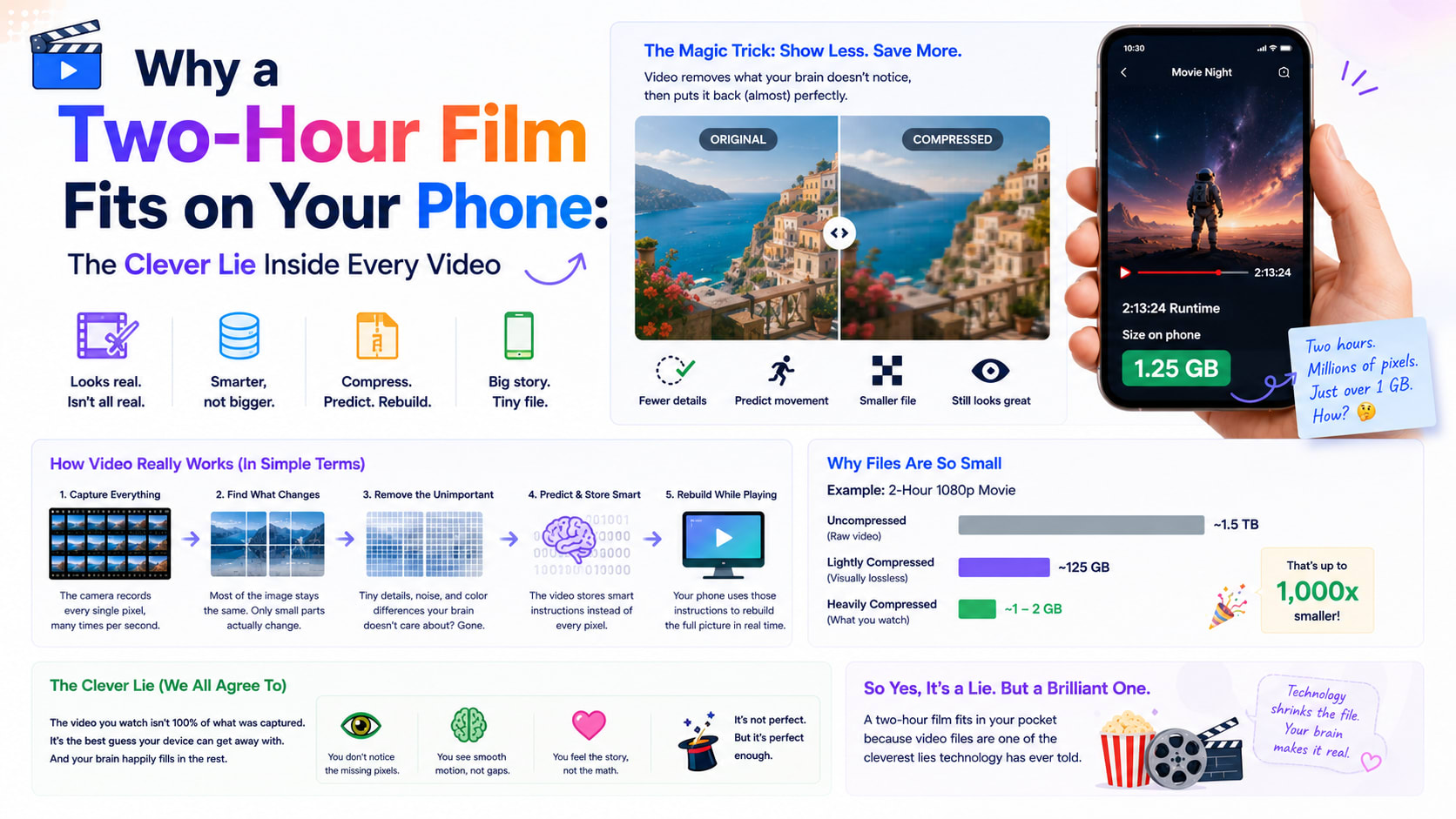
Here's a number that should be impossible. A single minute of raw, uncompressed 1080p video — the kind your phone's sensor actually captures before any processing — weighs in at over 11 gigabytes. A two-hour film in that raw form would need around 1.5 terabytes. And yet you stream that same two-hour film over a phone connection, on a train, while it buffers maybe once. The file you actually receive is a few gigabytes at most, often far less.
Something has quietly thrown away more than 99% of the original data and left a movie that still looks, to your eyes, perfect. That something is video compression, and the central trick it uses is one of the most elegant cons in all of technology: it bets, correctly, that most of every video is a lie you won't notice.
Why raw video is monstrously big
Start with where the bulk comes from. A video is just a flipbook — a sequence of still images, called frames, shown fast enough to fool your eye into seeing motion, usually 24, 30 or 60 per second. Each frame is a full image made of pixels, and each pixel needs about three bytes to record its color.
Do the arithmetic for one Full HD frame: roughly two million pixels times three bytes is about six megabytes — for a single frame. Play thirty of those every second and you're generating around 180 MB per second, or close to 1.5 gigabits every second. That's the raw firehose. No storage card, no home internet connection, no streaming service on Earth could move that around for every viewer. Video simply could not exist as we know it without aggressively shrinking that number, which is exactly what a video compressor does when it re-encodes a clip into something you can actually share.
The first trick: squeeze each frame like a photo
The first thing a video codec does is borrow from still-image compression. Each individual frame can be compressed much like a JPEG — exploiting the fact that the human eye is far better at noticing brightness than fine color detail, and tolerates the loss of subtle high-frequency texture. This is called intra-frame compression: making each frame, on its own, smaller.
But here's the thing — that alone isn't where the magic is. If video only compressed each frame independently, files would still be enormous. The real revolution, the idea that makes streaming possible, is about the relationship between frames.
The big con: most frames are nearly identical
Watch any video and freeze on a frame. Now picture the very next one, a thirtieth of a second later. In almost every case, the two are nearly the same. The background hasn't moved. The lighting is the same. Maybe a person's hand shifted a few pixels, or the camera panned slightly. The overwhelming majority of the image is simply repeated, frame after frame after frame.
A codec realises that storing all that repetition is absurd. So instead of saving every frame in full, it saves the occasional complete picture — a keyframe, or "I-frame" — and then, for the frames in between, it only records what changed. These in-between frames don't contain an image at all. They contain instructions like: "everything's the same as before, except this block of pixels moved eleven pixels to the right, and this patch over here got a little brighter."
That instruction — "this block moved over there" — is called a motion vector, and it's the heart of video compression. Rather than re-describing a moving car pixel by pixel in every frame, the codec says "take that car-shaped block from the last frame and shift it." A few numbers replace tens of thousands of pixels. This is inter-frame compression, and it's why video shrinks not by 10× like a photo, but by hundreds or even thousands of times.
Some clever codecs go further still, with frames that reference both the past and the future — predicting a frame by looking at where things were a moment ago and where they end up a moment later, then interpolating the middle. These are "B-frames," and they squeeze out even more redundancy.
Why confetti and water break everything
This also explains a frustration you've probably seen without understanding it: why certain scenes turn into a blocky, smeary mess. Compression depends on frames being predictable from one another. So it adores a static talking-head interview, where almost nothing changes — it can describe minutes of footage with very little data.
It hates confetti, rain, crashing waves, fire, snow and shimmering water. In those scenes, nearly every pixel is genuinely new and random from one frame to the next; there are no blocks that simply "moved," because everything moved unpredictably. The codec's whole strategy collapses, and to stay within its data budget it's forced to throw away detail, producing the ugly blocking you see when a waterfall or a fireworks display falls apart on a stream. The lie stops working when the picture refuses to repeat itself.
A short history of the codecs
The rules for how to do all this are set by codecs (a blend of "coder-decoder"), and they've steadily improved for decades. MPEG-2 powered DVDs and early digital TV. Then came H.264, also called AVC, which arrived in the mid-2000s and became utterly dominant — it's still the most widely supported video format in the world, the safe default that plays virtually everywhere.
Its successor, H.265 / HEVC, roughly halved the file size again for the same quality, but it came tangled in a thicket of patent licensing that slowed its adoption. That licensing mess directly motivated the industry to build royalty-free alternatives: Google's VP9 (which powers much of YouTube) and then AV1, developed by an alliance of tech giants, which squeezes even harder and is free for anyone to use. Each generation buys roughly another 30–50% reduction for the same quality — a relentless march that lets video resolutions climb while bandwidth stays manageable.
One common confusion worth clearing up: a codec is not the same as a container. MP4, WebM and MOV are containers — boxes that hold the compressed video and audio together. H.264, VP9 and AV1 are the codecs — the actual compression inside the box. An ".mp4 file" tells you the box, not necessarily what's inside it.
What "compressing" a video actually changes
When you shrink a video yourself, you're pulling on two main levers. The first is resolution — the pixel dimensions, like dropping 1080p to 720p. Fewer pixels per frame means less to store, and on a phone screen the difference is often invisible. The second, and the more powerful, is bitrate — how much data the codec is allowed to spend on each second of footage. Lower the bitrate and the file shrinks almost proportionally; lower it too far and the codec runs out of room to hide its lies, and artefacts creep in.
The sweet spot is usually lowering resolution and picking a sensible bitrate together. A phone records at a wastefully high bitrate to be safe; re-encoding a 1080p clip down to 720p at a reasonable bitrate routinely cuts the file by two-thirds or more while looking practically the same on the screens where it'll actually be watched. You can see this directly: drop a phone clip into a video compressor, choose 720p and a balanced quality, and watch a 50 MB clip become 10 MB without an obvious loss.
Why doing it in your browser is slow but private
There's a catch to compressing video anywhere, including in a browser tab: unlike trimming, which just snips a file, real compression has to decode and re-encode every single frame. There's no shortcut — the computer has to look at all that footage and rebuild it under the new rules. That's why an honest in-browser compressor processes a clip in roughly the time it takes to play, and why phone apps churn for a while on a long video.
The upside of doing it locally is significant, though: your footage never leaves your device. No upload, no waiting on someone's server, no question of who keeps a copy, and no watermark stamped across your video as the price of a "free" cloud tool. For personal clips, that privacy trade — a little patience in exchange for nothing leaving your machine — is usually worth it.
The beautiful illusion
Step back and the whole enterprise is faintly absurd. Every video you watch is mostly not there. The codec shows you a handful of real pictures and, for everything in between, hands your screen a set of instructions for faking the rest — shift this block, brighten that patch, assume the background hasn't changed. Your eyes and brain, evolved to track motion in a noisy world, happily fill in the illusion and never suspect a thing.
That illusion is what fits a film on a phone, streams a match to millions at once, and lets you fire a holiday clip across a chat app in seconds. Understanding it changes how you think about that "compress" button: you're not damaging your video so much as deciding how boldly to let it lie. Lower the resolution, ease the bitrate, and you're simply giving the codec permission to repeat itself a little more — usually in ways no one watching will ever catch. If you've got a clip that's too big to send, you can put all of this to work in a couple of clicks with a private, browser-based video compressor, and keep the original safely on your own device.
