The Image Format You Can Actually Read: Why SVG Is Secretly Just Text
Open an SVG in a text editor and you can read it — angle brackets, shapes, colors in plain hex. It's not a picture, it's a recipe. Here's why that changes everything, from infinite scaling to the scri
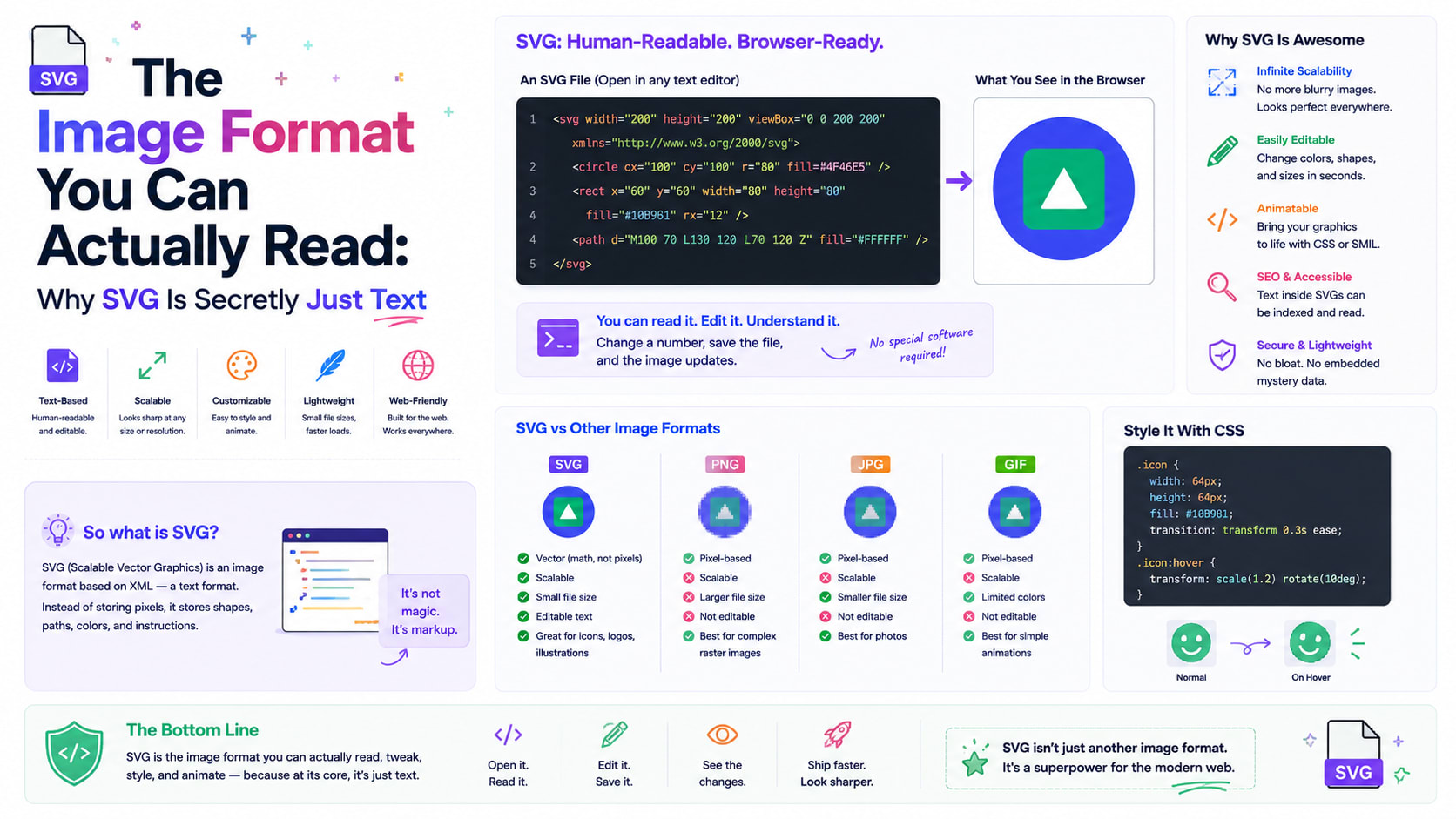
Open almost any image on your computer in a text editor and you'll get gibberish — a wall of unreadable binary that crashes your screen with noise. Do the same with an SVG and something startling happens: you can read it. There are angle brackets, words like circle and path, numbers you can change, colors spelled out in plain hex. An SVG isn't a picture in the usual sense at all. It's a little document — a set of instructions written in text — that your browser performs into an image, fresh, every time you look at it.
That single difference makes SVG one of the most quietly powerful formats on the web, and one of the most misunderstood. Once you see images as something you can write, the whole category starts to feel different.
Two completely different ideas of "image"
The images you know best — JPEGs, PNGs, the photos on your phone — are raster images. A raster image is a grid of colored dots called pixels, like a mosaic. To store a photo, the file records the color of every single tile. That works beautifully for photographs, where every pixel really is different, but it has a hard limit: blow the picture up beyond its pixel count and you just get bigger, blurrier tiles. There's no more detail to find, because the image is, fundamentally, a fixed-resolution mosaic.
SVG takes the opposite approach. Instead of recording pixels, it records instructions: "draw a circle here, this big, filled blue," "trace a line from this point to that one, three units thick." The drawing is described as pure geometry — shapes, coordinates and math. The letters SVG stand for Scalable Vector Graphics, and "scalable" is the magic word. Because the file stores the recipe rather than the result, the browser can redraw it at any size, from a tiny favicon to a billboard, and it stays razor-sharp every time. There are no pixels to run out of. A logo saved as SVG looks perfect on a watch face and a cinema screen, from the very same file.
Why being "just text" changes everything
Here's the part that surprises people. Because SVG is built on XML — the same tag-and-attribute structure as HTML — an SVG file is genuinely human-readable text. And that unlocks a list of superpowers no raster format can match.
You can edit it in any text editor. Want to change a logo from blue to green? Find the fill="#0000ff" and type a new value. No image software required. You can generate it with code — charts, diagrams and data visualisations are routinely drawn by programs that simply write SVG text on the fly, which is how interactive dashboards render crisp graphics for any dataset. You can search and diff it — version-control systems like Git can show you exactly which line of an icon changed between two versions, something impossible with a binary blob. And it compresses astonishingly well, because text full of repeated tags is exactly what compression algorithms love.
It's also tiny for simple things. A solid circle described in SVG is a few dozen characters; the same circle as a PNG, with all its pixels spelled out, can be many times larger. For icons, logos and line art, SVG is usually both sharper and smaller — a rare win on both fronts. If you've ever wanted to see this for yourself, pasting any icon into an SVG previewer and watching the byte count shrink when you minify it makes the point instantly.
A peek at the recipe
The heart of most SVGs is the humble <path>, and its d attribute hides a tiny language of its own. A string like M 10 10 L 90 10 L 50 90 Z reads as a set of pen commands: Move to a point, draw a Line to another, then Z to close the shape — in this case, a triangle. Add curve commands and you can describe flowing, organic shapes using Bézier curves, the same elegant mathematics that powers every font you read and every smooth line in design software. Every letter on this page is, underneath, a set of Bézier curves not unlike those an SVG uses.
That's the quiet beauty of it: an entire illustration, no matter how intricate, comes down to a sequence of points and curves written as text. Inspect a complex SVG and you'll often find one enormous path whose d attribute is a paragraph of coordinates — a drawing transcribed into a string.
Where SVG came from
SVG's existence is the happy ending of a small standards war. In the late 1990s, as the web grew hungry for real graphics, two camps proposed rival text-based image formats. Adobe and Sun backed one called PGML; Microsoft and Macromedia pushed a competitor named VML. Rather than let the web fracture into incompatible formats, the World Wide Web Consortium took the best ideas from both and forged a single open standard. SVG became an official W3C recommendation in 2001, and after a slow start — early browsers supported it poorly — it has become utterly ubiquitous. Today it powers the icons in your apps, the logos on websites, the charts in your reports, and the crisp graphics on every high-resolution screen.
That timing matters. SVG was almost too early; for years, patchy browser support kept designers reaching for PNGs. The arrival of high-density "Retina" displays is what finally made it indispensable, because suddenly a single resolution-independent file beat shipping two or three pixel-doubled raster versions of every icon.
The sharp edge: an image that can run code
Now for the twist that every developer should know, because it's where SVG's power becomes a genuine risk. Since an SVG is a document, not a flat picture, it can contain things flat pictures never could — including JavaScript. An SVG can carry a <script> tag, hook into events, even load external resources. That's wonderful for building interactive maps and animated infographics. It's alarming when an SVG arrives from someone you don't trust.
This is why "let users upload a profile picture" has bitten countless websites: accept an SVG without care and an attacker can smuggle in a script that runs in your visitors' browsers — a classic cross-site-scripting attack hiding inside what looks like a harmless image. The defenses are well known: serve user-uploaded SVGs in ways that neutralise scripts, sanitise the markup to strip dangerous tags, or render them as plain images. In fact, that last approach is exactly why a safe previewer shows SVGs through an image element — browsers refuse to run scripts inside an image-rendered SVG, so you can inspect a stranger's file without fear. When you drop unknown SVG into a previewer and it renders without anything executing, that's this safety net at work.
It's a neat illustration of a deeper truth in computing: the same feature that makes something powerful — here, that an image is really live code — is the same feature that makes it dangerous. Flexibility and risk are two views of the same coin.
Animation, accessibility, and other quiet perks
A few more things SVG can do that its raster cousins simply can't.
Because it's part of the page's document, SVG can be animated declaratively — with built-in animation tags or ordinary CSS — so logos shimmer and loading spinners spin without a single video file or GIF. It's accessible: you can give shapes <title> and <desc> text that screen readers announce, and any text inside an SVG stays real, selectable text rather than baked-in pixels, which means it can be read aloud, searched, and translated. And it's styleable from outside: a single SVG icon can change color to match a dark theme just by inheriting a CSS value, no second file needed.
Each of these flows from the same root fact — that an SVG is a living part of the web page rather than an opaque rectangle dropped on top of it.
When not to reach for SVG
For all its gifts, SVG is not a universal answer, and knowing its limit is part of using it well. It is hopeless for photographs. A photo has no neat shapes to describe — every pixel is its own little accident of light — so trying to store one as vectors would mean millions of tiny instructions and a file far larger than a JPEG, with no benefit. The rule of thumb is simple and durable: vectors for the made things — logos, icons, diagrams, type, illustrations; rasters for the captured things — photographs and anything richly textured. Use each where its strengths lie and both formats feel effortless.
The image you can have a conversation with
What makes SVG genuinely special isn't just that it scales, though that alone earned its place on the modern web. It's that it collapses the wall between "picture" and "code." An SVG is something you can open, read, understand, tweak, generate, animate, search, and version — an image you can reason about and argue with, rather than a sealed box of pixels.
The best way to feel that is to look inside one. Grab any icon, paste it into an SVG previewer, and poke at it: change a color, watch the shapes, read off the paths, count the elements, shrink it with a minify. Somewhere in that little document of angle brackets is a complete drawing, waiting to be performed — and once you've seen an image as something you can simply write, you never quite look at the others the same way again.
