The 256-Colour Survivor: Why the GIF Refuses to Die (and Why It's So Big)
It shows 256 colours, barely compresses, and a five-second clip can be ten times bigger than the same MP4 — yet the GIF is everywhere. Inside the dithering, the patent war that created PNG, the 'JIF'
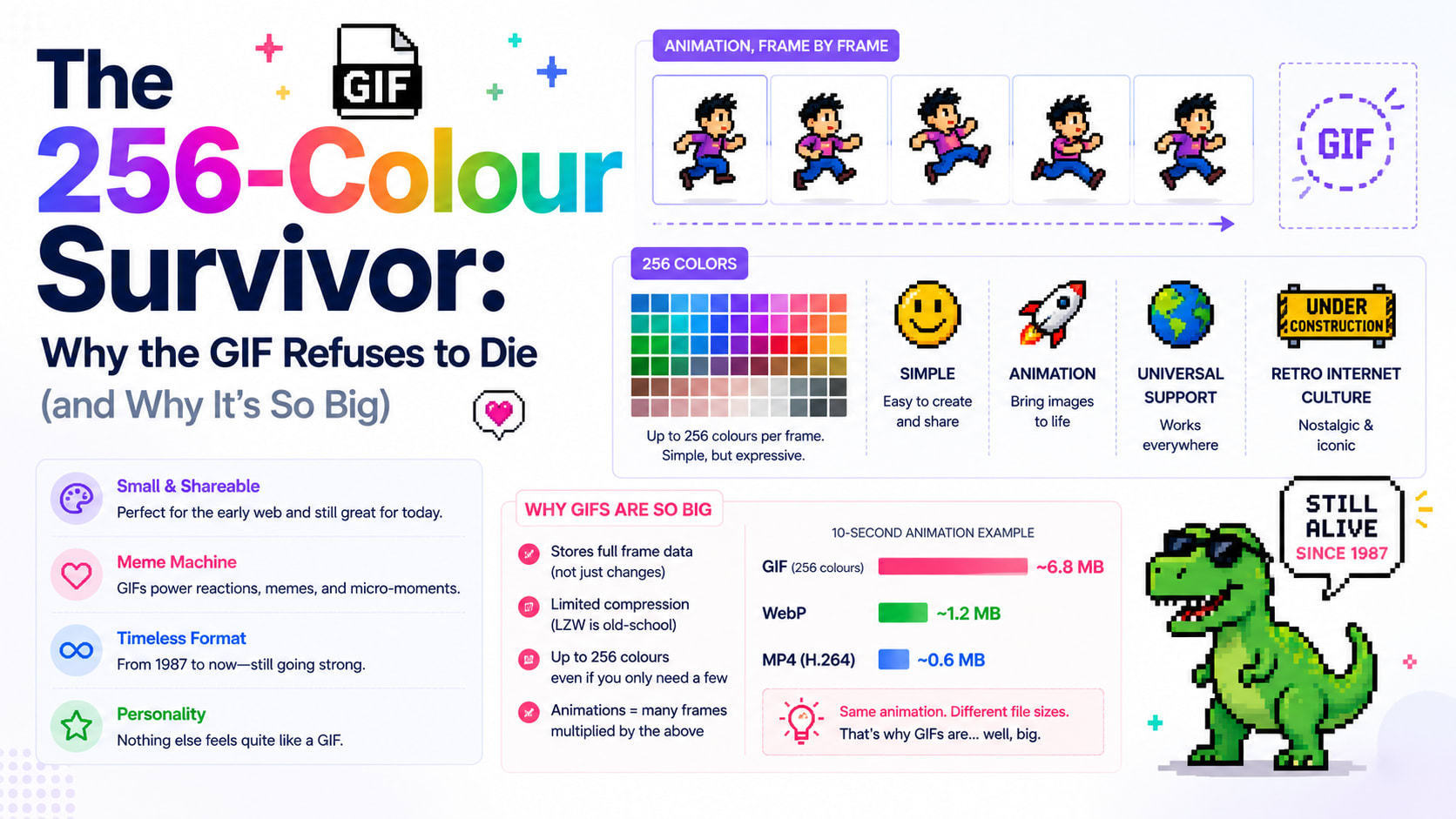
It is, by every technical measure, a terrible way to store video. It can show only 256 colours at once. It has no real compression between frames. A five-second clip that fits in a one-megabyte MP4 can balloon into a ten-megabyte GIF. It was designed in 1987 for a world of dial-up modems and has been declared obsolete more times than anyone can count. And yet the GIF is everywhere — the universal language of reactions, the format your group chat speaks fluently. How does a thirty-five-year-old, deeply inefficient file format not just survive but thrive?
The answer is a wonderful tangle of clever engineering, an ugly patent war, a peanut-butter pronunciation feud, and a second life nobody saw coming.
Born in the age of the modem
The GIF — Graphics Interchange Format — was created in 1987 by a developer named Steve Wilhite at CompuServe, the online service that connected people before the web existed. The problem he was solving was brutally practical: images needed to move across phone lines at a few hundred bits per second, and they had to look the same on the wildly different computers of the era. GIF was the answer — a compact, portable image format that any machine could display.
Two years later, the 1989 revision, GIF89a, quietly added the features that would define its future: transparency, and the ability to store multiple images in one file with timing between them. That last feature was meant for simple slideshows. Almost by accident, it had invented the animated image.
Crucially, GIF leaned on a compression method called LZW (Lempel–Ziv–Welch), which squeezed images by spotting repeated patterns. For the simple logos, icons and line art of early computing, it worked beautifully. That choice made GIF fast and small for its time — and, as we'll see, nearly killed it.
The 256-colour straitjacket
Here's the limitation that explains almost everything about how a GIF looks and weighs. A GIF can use a palette of only 256 colours at a time. Each pixel doesn't store a full colour; it stores an index — a number from 0 to 255 pointing to a slot in that little palette.
For a cartoon or a logo with a handful of flat colours, 256 is plenty. For a photograph or a video frame, with its millions of subtle shades, 256 is a desperate shortage. To fake the missing colours, GIF encoders use dithering — scattering dots of the available colours so that, from a distance, your eye blends them into shades that aren't really there. It's the same trick old newspapers used with black dots to suggest grey. Done well, dithering is invisible; done badly, you get the muddy, banded, speckled look of a cheap GIF.
This is exactly why converting a video to a good GIF takes care. A naive conversion picks a generic palette and the result looks washed out. A smart converter does it in two passes: first it studies your specific clip and builds the single best 256-colour palette for that footage, then it renders the animation using that custom palette with careful dithering. The difference is night and day — and it's why a quality video-to-GIF tool takes a moment to "analyse colours" before rendering.
Why GIFs are so heavy
Now the size problem. Modern video codecs are small because they're clever about time: they store one full frame, then for the next frames record only what changed — a moving mouth, a panning background — discarding the vast redundancy between frames. A GIF does almost none of this. Each frame is essentially its own palette-indexed image, and the gains from frame-to-frame similarity are minimal compared to real video compression.
So a GIF pays twice: it can't use colour efficiently (stuck at 256) and it can't use time efficiently (little inter-frame compression). The result is that a few seconds of motion, trivial for an MP4, becomes a heavyweight GIF. That's why the two biggest levers on GIF size are length and frame rate — fewer frames, smaller file — and why keeping clips short and the frame rate modest is the whole art of making a shareable GIF.
The patent war that created PNG
The GIF's strangest chapter is the one most people have never heard. The LZW compression at GIF's heart was patented by a company called Unisys. For years nobody worried about it — until the mid-1990s, when Unisys began enforcing the patent and demanding licensing fees from software that created GIFs.
The web community was furious. A format that had become a backbone of the early web suddenly carried a legal toll. The backlash spawned a campaign — "Burn All GIFs" — and, more importantly, a constructive response: developers set out to build a free, unencumbered alternative. The result was PNG (Portable Network Graphics), created in 1996 specifically to replace GIF for still images, with better compression and millions of colours, owned by no one. PNG is now one of the most-used image formats on earth, and it exists largely because of a fight over the GIF.
The LZW patents finally expired in the early 2000s, and GIF became free to use everywhere. By then the damage and the irony were complete: the format's biggest crisis had birthed its most successful replacement — yet GIF, for stills, faded while quietly conquering an entirely different territory.
"JIF" or "GIF"? The feud that won't end
No history of the GIF is complete without the pronunciation war, because its creator settled it and nobody listened. Steve Wilhite was adamant: it's pronounced "JIF," with a soft G, like the peanut butter. In 2013, accepting a lifetime achievement award, he reiterated it in giant letters on screen: "It's pronounced JIF, not GIF." Half the internet rolled its eyes — *it stands for Graphics, it's a hard G.* The debate has never been resolved and probably never will be. It remains one of technology's great trivial holy wars, a rare case where the inventor's ruling carries almost no authority over the crowd.
The unlikely resurrection
By the late 2000s the GIF should have been a museum piece. Then social media handed it a second life. On Tumblr, users discovered that looping, soundless, autoplaying GIFs were the perfect medium for reactions and movie moments. Then services like Giphy turned the GIF into a searchable keyboard built into messaging apps. Suddenly the format's "flaws" were features: it loops forever, plays instantly with no controls, needs no sound, and works in an email, a forum, a chat — anywhere an image can go.
Here's the delicious technical irony, though: most of the "GIFs" you send today aren't GIFs at all. Because real GIFs are so heavy, platforms like Twitter, Reddit and Slack quietly convert your uploaded GIF into a tiny MP4 or WebM video behind the scenes, then loop it silently to look like a GIF. The word "GIF" has detached from the file format and come to mean a short, silent, looping clip — whatever's actually delivering it. The format won the culture war by losing the technical one.
When a GIF is actually the right choice
For all its inefficiency, there are real moments when a genuine GIF is exactly what you want, and it's worth knowing them. You need a true .gif file when something must autoplay and loop with zero setup in a place that won't run a video — an email signature, an old forum, a documentation page, a chat that doesn't transcode. You want it for short, punchy, looping moments: a reaction, a three-second demo, a logo animation. And you want it when universal compatibility matters more than file size, because nothing on earth fails to display a GIF.
What you should not do is turn a 30-second clip into a GIF and wonder why it's 40 megabytes. For anything long or detailed, a video file is dramatically smaller and sharper. The skill is matching the tool to the job: trim to the few seconds that matter, keep the frame rate reasonable, and let a smart palette do the rest.
The format that refused to die
The GIF is a glorious contradiction — technically outdated, wildly inefficient, colour-starved, and utterly irreplaceable. It survived a patent war that created its own successor, an inventor who couldn't get the world to say its name right, and decade after decade of predictions that it was finished. It endures because it does one thing no newer format quite matches: it just works, instantly and everywhere, as a tiny looping window of motion.
If you want to make one — properly, with a clean custom palette instead of the muddy default — you can trim a clip and convert it right in your browser with a video-to-GIF tool, no upload required. You'll be using a 1980s format, refined by a patent fight and resurrected by meme culture, running on a video engine compiled into a web page. Few things capture the strange, layered history of the internet quite so neatly as a humble GIF.
